Car gadgets are worth buying when they solve a problem you actually have, such as recording a collision or keeping your phone secure. We researched the features that matter in 2026 and the common reasons accessories disappoint. Here is what deserves a place in your car—and what is easier to skip.
Dash Cams: Useful Evidence, Not a Safety Shield
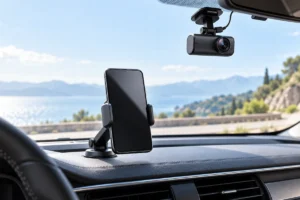
A dash cam can help document what happened in a crash or parking incident. Look for readable footage in daylight and at night, reliable loop recording, and a mount that stays put. A clear view of license plates matters more than an impressive resolution number on the box.
Check how recordings are saved. Some cameras need a high-endurance memory card, which may be sold separately. If you want parking recording, ask whether it requires a hardwire kit and whether that kit protects the car battery from draining. A rear camera adds coverage, but it also means more cable routing.
Heat is a practical concern because a camera may sit behind the windshield for hours. A model with a capacitor rather than a small internal battery may be a better fit for hot conditions, though no device should be assumed heatproof. Our guide to protecting gadgets from summer heat explains the broader risks.
Skip a dash cam if you will not maintain its storage or check that it still records. Also check local rules on windshield placement, audio recording, and sharing footage.
Phone Mounts: Stability Beats Extra Features
A good phone mount keeps navigation visible without making you reach or look far from the road. Before choosing one, sit in the driver’s seat and identify a position that does not block your view, controls, vents, or airbags. A mount that fits another car may be a poor fit for yours.
Vent mounts are easy to move but can block airflow or slip on unusual vent shapes. Dashboard and windshield mounts can offer steadier placement, though adhesives and suction cups may struggle with textured surfaces or heat. Check the mount’s size range against your phone and case, and make sure you can attach the phone with one hand while parked.
Magnetic mounts can be convenient if their compatible case or ring holds securely. Built-in wireless charging is less important than a stable grip and a sensible viewing angle. Charging may also add heat during navigation; our advice on keeping a phone battery healthy is useful if your phone spends long trips on a charger.
Set your route before driving. Even a well-placed mount does not make typing behind the wheel safe.
Bluetooth Adapters: A Sensible Fix for Older Cars
If your car has an auxiliary input but no Bluetooth audio, an adapter can be a simple upgrade. It lets your phone send music and spoken directions through the car’s speakers without replacing the stereo. Check whether the adapter needs its own power and whether its microphone is positioned well enough for calls.
FM transmitters serve cars without an auxiliary input. They send audio over a selected radio frequency, so results depend on local station traffic and interference. You may need to change frequencies during a long drive. They are useful in the right car, but they are not a reliable way to get perfect sound.
Before buying either type, check whether your stereo already supports Bluetooth through a menu you have not used. Also confirm that the adapter handles the task you need: music playback, calls, or both. A device that plays music well may still have a weak microphone.
Skip an adapter if your main goal is wireless CarPlay or Android Auto and the device only promises Bluetooth audio. Those are different features. Avoid adapters that cover nearby controls or require you to manage loose cables while driving.
Car Chargers: Match the Port to the Phone
A car charger is worth having when navigation, calls, or a long trip can outlast your phone’s battery. Start with the ports you need for everyone who rides with you. A compact charger with the right connections is more useful than one crowded with ports you will never use.
For USB-C phones, check whether the charger supports the charging standard and output your phone can use. The cable matters too: an unsuitable or damaged cable can limit charging or cause an unreliable connection. Our guide to USB-C cables, chargers, and speeds can help you sort out the labels.
Many cars also have built-in USB ports, but some provide power slowly. Test the port you already have before adding another charger. If your phone gets unusually warm while running navigation, reduce direct sun exposure and consider whether wireless charging is adding unnecessary heat.
Skip chargers that advertise huge output without clearly stating what each port can deliver when several devices are plugged in. Do not leave loose cables near pedals or the gear selector, and replace any charger or cable that becomes damaged.
Small Safety Accessories That May Earn Their Space
Some of the most useful car accessories are not especially high-tech. A tire-pressure gauge can help you verify pressure against the recommendation on your car’s door label. A compact tire inflator can be helpful if you have a safe place to stop, but it does not repair a damaged tire or replace roadside assistance.
A portable jump starter may be useful for a weak starter battery. Check that it is suitable for your vehicle and follow both manuals carefully. It needs periodic charging and safe storage; a forgotten, depleted unit will not help much. Vehicle-specific limits and battery condition still matter, so do not treat a jump starter as a guaranteed fix.
A simple flashlight and a charging cable you know works can also be more valuable than a complicated emergency gadget. Keep items secured where they will not become hazards during a sudden stop. Review your kit occasionally, especially before a long trip.
Skip bulky multi-tools that combine several weak functions if you only need one. Choose accessories around realistic situations, your storage space, and the skills you are comfortable using safely.
Car Tech That Is Usually Easy to Skip
Not every gadget that plugs into a car makes driving better. Decorative cabin lights, animated displays, and novelty sound effects can add clutter or distraction without solving a problem. If an accessory draws your attention away from the road, its entertainment value is a poor trade.
Be skeptical of plug-in devices that make sweeping claims about fuel savings, engine performance, or diagnostics without clearly explaining what they measure or change. A basic diagnostic code reader can be useful for understanding a warning code, but a code alone is not a diagnosis. You may still need a qualified mechanic.
Be careful with screens or adapters that promise to add features your car does not support. Compatibility can depend on the exact vehicle, stereo, phone, and software. Read the requirements rather than assuming a shared connector means everything will work.
Finally, skip gadgets you cannot place safely. An extra display that blocks sight lines, a cable hanging near pedals, or a mount attached in an airbag deployment area is not a worthwhile upgrade. The best car setup is often the simplest one that handles your real needs.
A Practical Way to Choose What to Add
Start with a problem, not a product category. If your phone falls during navigation, consider a mount. If the car has no convenient way to play phone audio, check the stereo’s inputs before choosing an adapter. If you regularly need proof of road incidents, consider a dash cam and the upkeep it requires.
- Confirm compatibility: Check your car’s ports, available space, and your phone’s charging requirements.
- Check placement: Nothing should obstruct your view, controls, airbags, or movement.
- Count the upkeep: Dash cams need storage checks; jump starters need charging; mounts may need cleaning or adjustment.
- Try what you own first: A working built-in USB port or Bluetooth connection may already solve the problem.
For trips where charging away from the car matters too, read our explanation of what portable power bank specifications mean. A power bank is not a substitute for a car charger on every drive, but it may be more flexible when you also spend time away from the vehicle.
Choose one useful improvement at a time. That makes it easier to notice whether it helps, creates clutter, or needs more maintenance than expected.
Frequently Asked Questions
Is a dash cam worth getting for an older car?
It can be, because recording an incident does not depend on the car being new. Check mounting rules, power options, and whether you are willing to maintain the memory card.
Will a Bluetooth adapter add wireless CarPlay or Android Auto?
A basic Bluetooth audio adapter will not. Check the exact features supported by your car and the adapter before choosing one.
Is wireless charging better than a cable in the car?
Wireless charging is convenient, but a compatible cable may be simpler and can produce less heat. Choose the setup that holds your phone safely and charges it reliably.
What car gadget should I get first?
Start with the problem you encounter most often. For many drivers, a secure phone mount or a reliable charger is more immediately useful than adding another screen.
Final Thoughts
The car gadgets worth buying in 2026 do ordinary jobs reliably: hold a phone, provide power, connect audio, or record the road. Check fit, safety, and upkeep before adding anything. If a gadget mainly promises excitement or an effortless fix for a complex problem, you can probably skip it.