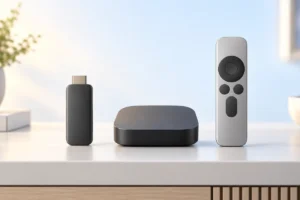
A streaming stick, a streaming box, and your TV’s built-in apps can all open the same shows, but they do not always feel the same to use. The best choice depends on how quickly apps respond, which services you need, and whether the remote makes everyday viewing easy.
Stick, Box, or Built-In Apps: What Changes?
A streaming stick plugs into an HDMI port and usually draws power from a wall adapter. It adds its own home screen, apps, and remote to almost any TV with HDMI. A streaming box does the same job in a larger body, often with more storage, stronger hardware, or extra connections.
Smart TV apps run on the TV itself. They need no extra device or HDMI port, and one remote may be enough for everything. That is convenient if the apps you use are already there and respond quickly.
The important difference is that a separate device can be replaced without replacing the screen. TVs often remain useful for years after their built-in software starts to feel slow. A stick is therefore a practical upgrade for many otherwise good TVs, while a box makes more sense when you need specific features or connections.
If your TV is also the center of a connected living room, our smart home starter guide can help you decide which other devices are worth adding. You do not need a smart home setup to use any of these streaming options.
Speed Depends on More Than the Menu
A fast streaming experience means more than smooth video. It also means the home screen opens promptly, search responds, and apps do not take a long time to start. Recent sticks can feel quicker than the built-in apps on an older TV because the stick has its own processor and software. A well-designed new TV, however, may already be fast enough.
Boxes often have an advantage when you switch between many apps or use more demanding features, but a box is not automatically faster than every stick. Hardware and software vary by model. Before replacing anything, restart your TV or device, install available updates, and check whether one slow app is causing the problem.
Internet trouble can look like a slow device. If menus respond normally but videos buffer or drop in quality, check your Wi-Fi signal and network traffic first. Place a stick where it can get a reliable signal; an HDMI extender may help when the TV blocks reception. Our guide to Wi-Fi 6 and Wi-Fi 7 explains when changing your network equipment is likely to help.
Check App Support Before You Choose
Do not assume that a device has every streaming service. Check the exact apps you use, especially local channels, sports services, and smaller subscription platforms. App availability can differ by device platform and country. Even when an app exists, some features may be missing from its TV version.
Sticks and boxes generally offer broad app stores, which is one reason they can be safer choices than relying on built-in TV apps for years. A TV maker may stop updating an older model, or an app provider may eventually stop supporting it. A separate streamer does not guarantee permanent support, but replacing it is easier than replacing a TV.
Also check how you plan to watch. If you cast from a phone, confirm that the device supports the casting method your phone and apps use. If you watch through a web browser, do not assume a TV browser will work well with every video site. Official apps are usually the simpler route.
Finally, compare home screens. Some put recommendations and ads ahead of your apps. If that would bother you, look at the interface before choosing rather than judging by the app list alone.
The Remote Matters Every Day
A good remote is easy to use without looking down. Clear navigation buttons, reliable volume control, and a simple way to reach your most-used apps can matter more than a small difference in processing speed. Voice search can help with long titles, but it is less useful if it often misunderstands names or searches services you do not use.
Many streaming remotes can control TV power and volume, reducing the need to keep two remotes nearby. Check compatibility before counting on that feature. Some setups use HDMI-CEC, which may need to be enabled in both the TV and streaming device settings.
Think about private listening, too. Depending on the device, you may be able to connect Bluetooth headphones or listen through a companion phone app. Confirm the specific method if it is important to you; it is not a standard feature on every streamer. If you are choosing something to listen with, our earbuds versus headphones guide covers the everyday trade-offs.
Built-in TV apps have one obvious remote advantage: there is nothing extra to pair or charge. If that remote is already comfortable and responsive, keep using it.
Match Video, Audio, and Connections to Your TV
Choose features your whole setup can use. A 4K streaming device will not turn a 1080p TV into a 4K screen. For high dynamic range, the TV, streaming device, app, and chosen title must support compatible formats. The same applies to advanced surround sound: a format listed on a box does not mean every service or sound system will play it.
For most households, a reliable HDMI connection and stable Wi-Fi are enough. A box may be worth considering if you need built-in Ethernet, more ports, or extra storage. Some sticks can use an Ethernet adapter, but compatibility and power requirements vary. Check those details for the exact model rather than assuming an adapter will work.
Sticks also need power. Use the supplied or recommended adapter when possible, since a TV’s USB port may not provide enough power for every model. If you are unsure whether a costly cable will improve streaming, read our guide to cheap versus expensive HDMI cables. The useful goal is a cable that reliably supports the video signal you need, not the fanciest packaging.
Think About Updates, Privacy, and Longevity
Streaming devices rely on software updates for security, app compatibility, and bug fixes. Before choosing one, look for a clear update policy where the maker provides one. No platform stays current forever, and update support can vary between models from the same brand.
A stick often beats older built-in TV apps because it gives an aging screen a newer interface and access to currently supported apps. That is a reason to consider one, not a reason to replace a TV system that still works well. If your current apps open quickly and provide everything you watch, there may be no benefit to adding another device.
Privacy settings deserve a look whichever option you use. TVs and external streamers may collect viewing or usage data, and some offer content recommendations based on your activity. Review the settings during setup, turn off optional tracking you do not want, and check what account is required. A separate streamer is not automatically more private than a smart TV.
Also consider household maintenance. Someone will need to manage accounts, updates, and occasional sign-ins. The simplest long-term choice is often the one everyone at home can operate without help.
Which Option Fits Your Household?
Keep using built-in TV apps if they are responsive, carry your essential services, and receive updates. This avoids another power cable, another home screen, and another remote to manage. There is no need to add hardware just because a newer option exists.
Choose a stick if your TV’s apps are slow, missing a service, or no longer well supported. For most people with a working HDMI TV, it is the simplest way to refresh streaming without paying for features they may never use. Check that it supports your TV’s resolution and the video formats you actually want.
Consider a box if you have a clear reason for its extras, such as a particular Ethernet setup, more storage, or capabilities required by your sound system or other equipment. Do not assume the larger device will make ordinary shows look better. The source video and the rest of your setup still set the limits.
If several people use the TV, let the least technical viewer try the interface before deciding where possible. Easy navigation, a readable home screen, and a remote that handles volume can outweigh a long feature list.
A Practical Comparison Checklist
Start with the TV you have and the services you actually watch. This short checklist helps separate useful features from impressive-sounding ones:
- Built-in apps: Best for a simple setup when your TV is still quick, updated, and has your essential apps.
- Streaming stick: Best for giving a good TV a fresher interface and broader app choice without a complicated setup.
- Streaming box: Best when you need a specific connection or feature that a stick does not provide.
- Before choosing: Check app availability in your country, remote controls, Wi-Fi reception, power needs, and support for your TV and audio equipment.
If you already own a smart TV, try its apps first. Note what bothers you: slow menus, a missing app, a poor remote, or buffering. A stick may solve the first two, a different remote setup may solve the third, and a network fix may solve the fourth. Knowing the actual problem makes it much easier to choose the right device.
Frequently Asked Questions
Is a streaming stick better than smart TV apps?
A stick can be a useful upgrade when built-in apps are slow or missing services. If your TV apps work well and stay updated, you may not need one.
Will a streaming box improve picture quality?
Not automatically. Better formats only help when your TV, the app, the video, and any audio equipment support them too.
Do streaming sticks need a separate power source?
They need power, usually from a wall adapter or a compatible USB connection. Check the device requirements because some TV USB ports do not supply enough power.
Can I use one remote for the TV and streaming device?
Many streaming remotes can control TV power and volume. Check compatibility and HDMI-CEC settings for your specific setup.
Final Thoughts
For most people unhappy with built-in TV apps, a streaming stick is the sensible first upgrade. Keep using your TV apps if they already do the job, and choose a box only when you need its specific extras. Whatever you choose, check your must-have apps and make sure the remote feels easy to use.