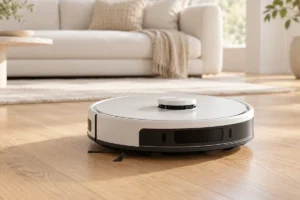
A robot vacuum can keep everyday dust and crumbs under control, but it will not replace every part of cleaning your floors. Before buying your first one, focus on your floor layout, the mess you need it to handle, and how much upkeep you are willing to do.
Start With Your Home, Not the Feature List
Walk through the rooms you want the robot to clean. Note the flooring, rug edges, door thresholds, tight gaps, stairs, and places where cords or small objects collect. These details matter more than a long list of features on a product page.
Most robot vacuums work best on open, fairly tidy floors. A thick rug, high threshold, or crowded room may stop a model that looks capable on paper. Check the robot’s height if it needs to fit under a sofa, and check its stated climbing ability against your thresholds. Remember that a robot cannot clean stairs.
Think about where the dock will go, too. It needs access to a power outlet and enough clear floor for the robot to return reliably. A self-emptying dock may need considerably more space than a basic charging dock.
If this is part of a wider connected-home plan, our smart home starter guide can help you decide which devices are worth setting up first. You do not need a smart home to benefit from a robot vacuum.
Suction Numbers Do Not Tell the Whole Story
Manufacturers often advertise suction using pascals, or Pa. That number can be useful for comparing settings within one product line, but it is not a dependable shortcut to better cleaning across different brands. Brush design, floor contact, airflow, and how the robot moves all affect what it picks up.
For hard floors, you may care most about whether the robot collects fine dust and crumbs without scattering them. For rugs, look at how it handles embedded dirt and whether it can increase suction when it reaches carpet. Edge cleaning matters if dust tends to gather along walls, though a round robot may still leave some corners for you to clean.
A large maximum suction claim may also describe a loud, battery-hungry setting you rarely use. Read independent reviews that show results on flooring like yours, and pay attention to cleaning consistency rather than one headline number.
Even a capable robot is a maintenance cleaner. Keep a regular vacuum available for stairs, upholstery, deep carpet cleaning, and the spots the robot cannot reach.
Navigation Can Matter More Than Raw Power
A robot that moves efficiently can clean more of your floor before its battery runs low. Basic models may change direction when they hit obstacles, while more advanced models plan routes using sensors and a map. Both can pick up dirt, but planned routes are often easier to manage in larger or more complicated homes.
Do not confuse mapping with obstacle avoidance. A robot may know the shape of a room yet still catch a charging cable, sock, or pet toy. Some models can recognize and steer around small objects, but performance varies, especially in dim light or around unusual items. Clear the floor before scheduled runs if you want fewer rescues.
Stairs are another reason to check the basics: look for cliff sensors and follow the maker’s setup guidance. No sensor system makes it wise to leave loose items at the edge of a landing.
For a small, simple room, basic navigation may be enough. If you want the robot to clean several rooms in a chosen order, return to unfinished work after charging, or avoid particular areas, reliable mapping becomes much more useful.
Decode Maps, Apps, and Wi-Fi Requirements
“Smart mapping” can mean different things. One robot might show you where it has cleaned; another might save a map so you can name rooms and set no-go zones. If you want to send the vacuum to the kitchen after dinner, confirm that it supports room selection—not just a picture of its route.
Check whether a model can save maps for more than one floor if you plan to carry it upstairs. Also check how maps are edited, whether no-go zones work without a physical barrier, and what happens if the map becomes inaccurate. These are practical differences you will notice long after setup.
Many app-controlled vacuums need a home Wi-Fi connection for setup or remote features. Some support only the 2.4 GHz band, so check the product requirements before buying. Our guide to Wi-Fi 6 and Wi-Fi 7 explains network terms, but a newer router standard alone will not make a robot clean better.
Finally, look at the privacy settings and what works without the app or internet. If you only need a button to start a full clean, an elaborate map may add complexity without much benefit.
Pet Hair Needs a Realistic Plan
A robot vacuum can be especially helpful when pets shed every day. Frequent runs can stop loose hair from building up on hard floors and low rugs. But pet hair does not disappear: it moves into the dustbin, brush, filter, and sometimes the dock bag.
Look for a brush that is easy to remove and clean. “Anti-tangle” does not mean you will never cut hair from a roller, particularly in homes with long-haired people as well as pets. A self-emptying dock can reduce how often you handle a full bin, but it adds size, noise during emptying, and replacement supplies.
Pet owners should also be cautious about automatic schedules. A robot that runs while you are away may encounter a spilled water bowl, pet waste, or a toy it cannot avoid. Obstacle recognition can help, but it is not a guarantee. Check the floor before a run, especially in rooms your pet uses most.
For furniture, stairs, and hair trapped deep in carpet, you will still need another cleaning tool. Buy the robot to reduce daily buildup, not to eliminate all pet-related cleaning.
Understand Mopping and Ongoing Upkeep
A vacuum-and-mop model may be convenient for light marks on hard floors, but “mopping” covers a wide range of designs. A basic model drags a damp pad behind it. Others press or move pads against the floor, lift them near rugs, or use a dock to wash them. None is a reason to ignore a sticky spill for days.
If you have rugs, confirm how the robot avoids wetting them. Does it lift the mop high enough, avoid rugs entirely, or require you to remove the pad? Also check which floor-cleaning liquids, if any, the manufacturer permits. Using an unsuitable liquid could damage the machine.
Every robot needs routine care. Expect to empty the bin or replace dock bags, clean the filter, remove hair from brushes, wipe sensors, and replace worn parts. A mop adds pads and water tanks to that list; a washing dock may need its dirty-water tank emptied and cleaned.
Place the dock where it will not sit in strong sun or excessive heat. Our guide to protecting gadgets from summer heat covers sensible precautions for electronics around the home.
A Practical First-Buyer Checklist
Before comparing models, write down what you actually need. This short checklist can separate useful features from extras that sound impressive but will not change your routine.
- Flooring: Note how much is hard floor, low rug, or thick carpet.
- Layout: Measure tight spaces and thresholds, and decide whether you need saved maps or room-by-room cleaning.
- Clutter: Count the cords, toys, and small objects that would need moving before a run.
- Pets: Look for an accessible brush and a bin or dock arrangement you will maintain.
- Mopping: Decide whether light damp wiping is enough or whether you need stronger stain removal.
- Ownership: Check the availability of filters, brushes, bags, and pads before settling on a model.
Give the dock a clear spot and make one test run while you are home. You will quickly learn which chair legs, rug edges, or cables need attention. If a desk area is the main trouble spot, the cable and layout ideas in our small-budget home office guide may help you make it easier for a robot to pass through.
Choose the simplest model that handles your floors and routine. A feature is only worth paying attention to if it solves a problem you actually have.
Frequently Asked Questions
Can a robot vacuum replace a regular vacuum?
Usually not. It can reduce everyday dust and hair, but you will still need another tool for stairs, upholstery, and deeper cleaning.
Do I need a robot vacuum with a map?
A saved map is useful for room-by-room cleaning and no-go zones. For a small, simple space where you only want full-floor runs, it may not be necessary.
Will a robot vacuum pick up pet hair?
It can help control loose hair with frequent runs, but you will need to clean its brush and empty its bin or maintain its dock.
Is a robot mop worth getting?
It may help maintain hard floors between manual cleans. Check how it handles rugs and pads, and do not expect it to remove every dried-on stain.
Final Thoughts
Your best first robot vacuum is one that fits your floors, moves through your home reliably, and is easy enough to maintain that you will keep using it. Treat suction claims, maps, and mopping labels as starting points for questions—not proof that a model will suit your home. A little floor preparation and realistic expectations will do more to prevent regret than choosing the longest feature list.