You do not need to spend a lot to get gaming gear that feels good and lasts. Many low-cost mice, keyboards, headsets and mouse pads now do the basics very well. The trick is knowing which specs matter and which ones are just marketing.
What “Cheap but Worth It” Really Means
A good budget accessory does the main job well and leaves out the extras. It might skip fancy software, metal parts or bright lighting. That is fine, as long as the core parts are solid.
For a mouse, the core is the sensor and the shape. For a keyboard, it is the switches and how well keys register when you press several at once. For a headset, it is comfort and clear sound. For a mouse pad, it is a smooth, even surface that stays put.
Cheap gear goes wrong when the maker cuts corners on those core parts. Common signs include a mouse that skips when you move it fast, a keyboard that misses key presses, or a headset that squeezes your head after an hour.
We researched spec sheets, user feedback patterns and long-term owner reports to put this guide together. The goal is simple: help you spot the good budget picks and avoid the ones that only look good in photos.
Budget Gaming Mice: Sensor and Shape Come First
The mouse is the accessory where a small upgrade makes the biggest difference. Luckily, it is also where budget options have improved the most.
Look for a mouse with a known optical sensor from a reputable maker. Many cheap mice now use the same sensor families found in more expensive models, just in a simpler shell. A good sensor tracks smoothly without jitter or sudden jumps.
Do not chase huge DPI numbers. Most players use somewhere between 400 and 3200 DPI. A box that says 16,000 or 26,000 DPI does not make the mouse better for most people.
Shape and weight matter more than people think. A mouse that fits your hand and grip style will feel better than a “better” mouse that does not. Lighter mice are easier to move quickly, but a few extra grams is not a problem for casual play.
Wired mice are usually the best value. Budget wireless mice exist, but they often trade off battery life or connection stability to hit a low price.
Budget Gaming Keyboards: Switches, Layout and Rollover
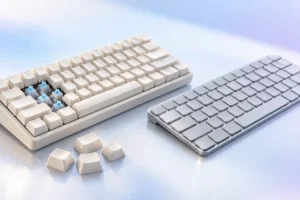
Budget keyboards come in two main types: membrane and mechanical. Membrane boards are quiet and cheap but feel softer and less precise. Budget mechanical boards have become very affordable and usually feel better for gaming and typing.
On a cheap mechanical board, the switches are often made by lesser-known brands. Many of these are perfectly usable. Hot-swappable boards are a nice bonus, because you can replace a bad switch or try new ones later without soldering.
One spec worth checking is key rollover. This tells you how many keys the board can register at the same time. Look for “anti-ghosting” or “N-key rollover” so the board does not drop inputs when you hold several keys in a game.
Layout is a personal choice. A smaller layout, such as tenkeyless or 75 percent, leaves more room for your mouse. A full-size board keeps the number pad, which is handy if you work with numbers.
Finally, check the keycaps. Thin, shiny keycaps wear quickly. Thicker keycaps feel better and last longer, but they are not essential on a first board.
Budget Gaming Headsets: Comfort and Clear Sound
Headsets are the hardest category to buy cheaply. Many low-cost headsets focus on loud bass and flashy looks, while the sound itself is muddy.
Comfort should be your first check. Look for soft ear cushions, a padded headband and a clamp that is firm but not tight. If you wear glasses, a softer clamp makes a big difference over long sessions.
For sound, a balanced headset is better than one with heavy bass. In games, clear mids and highs help you hear footsteps and voices. “Virtual 7.1 surround” is mostly software processing and can sound worse than plain stereo.
Microphones on budget headsets are usually fine for voice chat but not for streaming. A detachable or flip-to-mute mic is a useful extra.
Here is a helpful option many people overlook: a decent pair of wired stereo headphones plus a small clip-on or desk mic. This combo often sounds better than a gaming headset at the same price. Wired 3.5mm connections also work with most consoles, PCs and phones.
Mouse Pads: The Easiest Upgrade
A mouse pad is the cheapest upgrade on this list, and it can make a noticeable difference. A good surface helps your sensor track evenly and lets your mouse glide smoothly.
There are two main surface types:
- Control pads have a slightly rougher cloth. They make it easier to stop the mouse precisely.
- Speed pads are smoother. They let the mouse glide with less effort, which suits fast movement.
For most people, a standard cloth pad sits nicely in the middle. Look for a rubber base that grips the desk, and stitched edges so the pad does not fray over time.
Size matters too. If you play with low sensitivity and move your whole arm, a large or desk-sized pad is worth it. If you mostly move your wrist, a medium pad is enough.
Skip RGB pads if you are on a tight budget. The lights add cost and a cable, but they do nothing for performance.
Specs That Matter vs. Specs That Do Not
Gaming boxes are full of big numbers. Here is a quick way to sort the useful specs from the noise.
Worth paying attention to:
- Mouse sensor model and tracking reviews from owners
- Mouse weight and shape
- Keyboard switch type and anti-ghosting support
- Headset comfort, clamp force and cushion material
- Mouse pad surface type, base grip and stitched edges
- Cable quality, especially a flexible mouse cable
Mostly marketing at this price:
- Extremely high DPI numbers
- Very high polling rates on budget wireless mice
- Virtual surround sound labels
- RGB lighting effects
- “Pro” or “esports” in the product name
A polling rate of 1000Hz on a wired mouse is common and good. Going higher rarely matters for everyday players, and it can use more CPU on older computers.
Practical Buying Tips for Budget Gaming Gear
These simple habits will help you get the most from a small budget:
- Spend where you touch the most. If your budget is tight, put more toward the mouse and less toward lighting or extras.
- Read the low-star reviews. They often reveal real problems like double-clicking, broken cables or failing switches.
- Check the return policy. Comfort and shape are personal, so it helps to be able to return an item that does not fit.
- Look for a basic warranty. Even a short warranty from a known brand is better than none.
- Avoid big bundles. Keyboard, mouse and headset combo packs are often weaker in at least one item.
- Wait for common sale periods. Prices on accessories change often, so patience can help.
- Check compatibility. Make sure the headset connector and keyboard layout work with your PC or console.
As a rough guide, many well-reviewed budget wired gaming mice and cloth mouse pads sit at the lower end of the market, while budget mechanical keyboards and headsets usually cost a bit more. Prices vary widely by region and brand, so compare a few options before you decide.
Frequently Asked Questions
Is a cheap gaming mouse good enough for competitive games?
Often, yes. Many budget mice use reliable sensors that track well at normal speeds. Shape and comfort will matter more for most players than small sensor differences.
Should I buy a mechanical or membrane keyboard on a budget?
If you can stretch a little, a budget mechanical keyboard usually feels better and lasts longer. A membrane keyboard is fine if you want something quiet and very low cost.
Are wireless gaming accessories worth it at low prices?
Sometimes, but wired is usually better value. Cheap wireless gear may have shorter battery life or a weaker connection. If you go wireless, look for a 2.4GHz dongle rather than Bluetooth only for gaming.
Does a mouse pad really make a difference?
Yes. A good pad gives your sensor a consistent surface and makes movement smoother. It is one of the cheapest ways to improve how your mouse feels.
Final Thoughts
Good gaming gear does not have to be expensive. Focus on the basics: a reliable sensor and comfortable shape for your mouse, solid switches and anti-ghosting for your keyboard, comfort and balanced sound for your headset, and a smooth, stable mouse pad. Ignore the giant numbers and flashy lights, and you can build a setup that feels great without overspending.