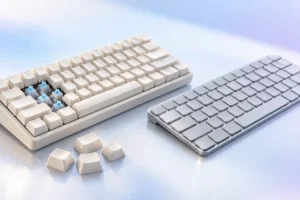
Shopping for a new keyboard can feel confusing, especially when everyone online insists that mechanical keyboards are the only “real” choice. The truth is simpler: both mechanical and membrane keyboards have clear strengths, and the right one depends on how you type, where you type, and what you want to spend. This guide explains the differences in plain language so you can decide for yourself.
What Is a Membrane Keyboard?
A membrane keyboard is the type most people have used for years. It is the keyboard that often comes bundled with an office desktop or sits on a school computer lab desk.
Under the keys, there are thin flexible layers of plastic with printed circuits. When you press a key, a soft rubber dome squashes down and pushes those layers together. That contact completes a circuit, and the computer registers the letter.
Because the design uses a few shared sheets instead of many separate parts, membrane keyboards are cheap to make, light, and usually quiet. Many are also fairly resistant to small spills, since the sealed layers keep liquid away from the electronics.
The downside is feel. Rubber domes tend to feel soft or “mushy,” and you usually need to press each key all the way down before it registers. Over time, the domes can wear unevenly, so some keys may start to feel different from others.
What Is a Mechanical Keyboard?
A mechanical keyboard gives every key its own small physical switch. Each switch has a spring, a moving piece called a stem, and metal contacts (or, in some newer designs, optical or magnetic sensors).
When you press a key, the stem moves down and triggers the switch partway through the press. That means you often do not need to push the key all the way to the bottom. Many people find this makes typing feel lighter and more precise.
Since every key is an individual part, mechanical keyboards feel more consistent from key to key. They also tend to last longer, and on many models you can replace a single broken switch or swap the keycaps for a new look.
If you want a deeper technical overview of how different keyboards detect key presses, Wikipedia has a helpful page on keyboard technology.
Mechanical Switch Types Explained Simply
The switch is the heart of a mechanical keyboard. Brands use many names and colors, but almost every switch falls into one of three basic groups.
- Linear: The key moves straight down smoothly with no bump and no click. Many gamers like linear switches because they feel fast and even.
- Tactile: You feel a small bump partway down the press. That bump tells your finger the key has registered, which many typists find helpful. They are usually fairly quiet.
- Clicky: These have a tactile bump plus a sharp, audible click. They are satisfying to some people and very annoying to others nearby.
Switches also differ in how much force they need. Lighter switches are easier on the fingers during long sessions, while heavier ones can help prevent accidental key presses.
One important tip: switch colors are not a universal standard. A “brown” switch from one maker can feel different from a “brown” switch from another. Always check the description for the words linear, tactile, or clicky.
Noise: How Loud Are They Really?
Noise is one of the biggest practical differences, and it matters a lot if you share a room, work in an open office, or join many video calls.
Membrane keyboards are generally the quietest option. The rubber domes soften each press, so you mostly hear a gentle tapping sound.
Mechanical keyboards are usually louder, but the range is wide. Clicky switches are the loudest by design, and microphones can pick them up easily. Tactile and linear switches are quieter, though you may still hear a “clack” when the key hits the bottom.
If you want mechanical feel without much noise, look for switches labeled “silent.” These use small dampers inside the switch to reduce sound. Some keyboards also include foam inside the case, which can make typing sound softer and less hollow.
Your typing style matters too. People who press hard and slam keys to the bottom will be louder on any keyboard than people with a lighter touch.
Feel and Typing Comfort
Feel is personal, so there is no single “best” answer. Still, there are some common patterns worth knowing.
Many people who switch to mechanical keyboards say typing feels crisper and more satisfying. Because keys register before they bottom out, a light typist may use less force overall. The consistent feel across all keys can also help with accuracy.
On the other hand, plenty of people are perfectly comfortable on membrane keyboards. If you mostly type short emails, browse the web, and do light office work, you may not notice a big difference in daily life.
Comfort also depends on things that have nothing to do with switches. Keyboard height, the angle of the keys, the size of the layout, and whether you use a wrist rest can all affect how your hands feel after a long day.
If you have wrist or hand pain, a keyboard type alone is unlikely to fix it. Good posture, regular breaks, and advice from a health professional matter more.
Price, Durability and Long-Term Value
Price is where membrane keyboards clearly win. As of late 2026, basic membrane keyboards from well-known brands are commonly found for roughly $10 to $40, depending on features and region.
Mechanical keyboards cost more, but the gap has narrowed. As of late 2026, entry-level mechanical models generally fall somewhere around $40 to $80, while mid-range and enthusiast boards can easily go above $100. Prices vary a lot by country and sale period, so treat these as rough guides only.
Durability can change the value picture. Mechanical switches are typically rated by manufacturers for tens of millions of key presses, and individual parts can often be repaired or replaced. Membrane keyboards tend to wear out sooner, and when they do, the whole keyboard is usually replaced.
That said, a cheap membrane keyboard that lasts several years of light use is still excellent value. A mechanical keyboard only makes financial sense if you will actually use it enough to appreciate the difference.
Quick Comparison and Practical Buying Tips
Here is a simple side-by-side summary based on what we researched:
- Noise: Membrane is usually quieter. Mechanical ranges from quiet (silent switches) to loud (clicky switches).
- Feel: Membrane feels softer. Mechanical feels crisper and more consistent.
- Price: Membrane is cheaper. Mechanical costs more up front.
- Lifespan: Mechanical generally lasts longer and is easier to repair.
- Spills: Many membrane keyboards handle small spills better, though no keyboard should be considered fully waterproof unless the maker says so.
A few practical tips before you decide:
- Try keyboards in person if you can, or ask a friend to let you type on theirs.
- Buy a cheap switch tester if you are unsure which switch type you like.
- Choose a “hot-swappable” mechanical keyboard if you want to change switches later without soldering.
- Consider a smaller layout, such as a tenkeyless board without the number pad, if desk space is tight.
- Check the return policy before buying, since feel is so personal.
Frequently Asked Questions
Are mechanical keyboards better for gaming?
Many gamers prefer them for the consistent feel and quick key response. However, skill and practice matter far more than the keyboard, and a decent membrane keyboard works fine for casual gaming.
Will a mechanical keyboard make me type faster?
Not automatically. Some people feel more accurate on mechanical switches, but typing speed mostly comes from practice. Expect a short adjustment period when you change keyboards.
Which switch type should a beginner choose?
Tactile switches are a popular middle ground. They give helpful feedback without the loud click, which makes them a safe first choice for both typing and gaming.
Are membrane keyboards bad?
No. They are affordable, quiet, and perfectly good for everyday use. They simply offer less key feel and usually a shorter lifespan than mechanical keyboards.
Final Thoughts
Mechanical keyboards are worth it if you type or game for many hours, enjoy a crisp and consistent feel, and want something that can last for years. Membrane keyboards are the smart pick if you want a quiet, budget-friendly keyboard for everyday tasks.
Neither choice is wrong. Think about your noise needs, your budget, and how much you type, and choose the keyboard that fits your daily life.