You do not need an expensive studio to record a song at home. A small audio interface can connect a microphone or instrument to your computer, but the right choice depends on what you want to record at the same time. Here is how to choose a simple setup without paying for features you will not use.
What an Audio Interface Actually Does
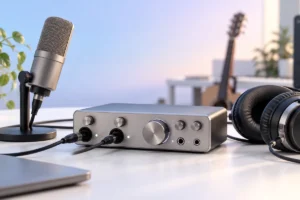
An audio interface is the connection between your recording gear and your computer. You plug a microphone, guitar, or other sound source into the interface. It turns that sound into a digital signal your recording software can use. It also sends sound back to your headphones or speakers so you can listen.
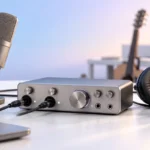
Most beginner interfaces connect by USB and sit on a desk. Their front panels usually have input gain controls, a headphone socket, and a way to adjust listening volume. Many also have a direct monitoring option, which lets you hear your input without waiting for the computer to process it.
The interface is only one part of the setup. You still need a suitable microphone or instrument cable, headphones, and recording software. A microphone may also need a stand and an XLR cable. Check what comes in the box before deciding which option costs less overall.
Good recordings depend on more than the interface. A quiet room, steady microphone position, and sensible recording levels can make a bigger difference than moving from one entry-level interface to another.
USB Microphone or Audio Interface?
A USB microphone combines a microphone and a basic audio connection in one device. For spoken voice, online lessons, or a single vocal track, it can be the simplest way to start. You connect it to your computer and select it in your recording app. Some USB microphones also have a headphone socket for monitoring, but not all do.
An audio interface is more flexible. It lets you choose a separate XLR microphone and connect instruments through the appropriate input. If you later change microphones, you can often keep the interface. It is also easier to record two sources together when the interface has two suitable inputs.
That flexibility adds cables and settings. You must choose the right input type, set gain, and arrange a way to listen. A USB microphone is not a poor choice just because it is simpler; it may be all you need for one voice.
If you mainly record guitar, plan to use an XLR microphone, or want room to expand, start by looking at interfaces. If your goal is to record speech with minimal setup, compare the full cost and convenience of a USB microphone first.
Count the Inputs You Need at the Same Time
Count simultaneous sources, not the number of tracks you hope to make. You can record one vocal, then record a guitar on another track using the same input. That process is called overdubbing. A single-input interface can therefore handle many solo projects.
Two inputs become useful when you want to record singing and guitar together, interview another person with two microphones, or capture a stereo keyboard output. Check the actual sockets: some compact interfaces offer one microphone input and one instrument input, while others let you choose either type on both channels.
A guitar plugged straight into an interface generally needs an instrument input, often marked “Inst” or “Hi-Z.” An XLR microphone needs a microphone input. A condenser microphone commonly needs 48-volt phantom power; check the microphone’s requirements before switching it on.
Planning to record several drum microphones at once changes the calculation. Two inputs will not capture each microphone on a separate track. Electronic drums may offer audio outputs or USB recording options, depending on the kit. Our guide to how an electronic drum set works can help you identify what your kit sends out before choosing an interface.
Focus on Useful Features, Not Big Numbers
For a first interface, usable controls matter more than impressive figures on a product page. Look for a clear gain knob for each input and an easy way to tell when a signal is too loud. If recordings sound distorted, turning down the input gain is often the first fix.
Direct monitoring is especially helpful when recording vocals or guitar. It feeds your live sound to your headphones with little delay from the computer. Some interfaces let you balance that live sound against playback from your recording software; others use a simple switch.
Check the headphone socket and speaker outputs against the gear you own. An adapter may solve a plug-size mismatch, but it is better to know about it before you set up. For recording and editing, wired headphones avoid the extra delay that wireless listening can introduce. If you are choosing a pair, our earbuds versus headphones guide explains the everyday trade-offs.
High sample-rate claims should not decide the purchase by themselves. A suitable input layout, dependable computer support, and controls you understand are more useful when you are learning to record.
Check Computer and Cable Compatibility
Before settling on an interface, check its current support information for your computer’s operating system. Some models work without a separate driver on certain systems; others need manufacturer software for full operation. Also check that the recording app you want to use can select the interface for both input and output.
Look closely at the USB connection. A USB-C-shaped port does not, by itself, tell you which cable is included or whether the interface will work with every phone, tablet, or computer. Match the interface’s stated requirements to your device and available ports. Our guide to USB-C cables, chargers, and speeds explains why the connector shape is only part of the story.
On a laptop, consider where the interface will sit and whether its cable will reach comfortably. If you use a USB hub, check the interface maker’s advice; connecting directly is a sensible first step when troubleshooting power or connection problems.
Finally, confirm what software is included and whether it remains useful without a subscription. You can also start with a compatible recording app you already know. A free software bundle is helpful only if it works on your computer and suits the way you record.
Sensible First Picks by Recording Goal
Rather than choosing a winner from specifications alone, start with the smallest interface that supports your actual sessions. For one singer who records instruments separately, a compact interface with one microphone input and one instrument input may be enough. The Focusrite Scarlett Solo is an example of this layout; check the specifications of the current version before comparing it with alternatives.
For two microphones or two sources recorded together, look at two-input models such as the Focusrite Scarlett 2i2, Audient EVO 4, or Behringer UMC202HD. We researched these as examples of commonly considered starter options, not as products we have personally tested. Features and included accessories can vary by model and revision.
If you only need narration, a USB microphone may still be the more sensible first pick. If you expect to add a second performer soon, buying an interface with two suitable inputs can avoid an early replacement.
Do not pay for extra inputs because you might someday use them. Spend time checking the microphone, cables, computer support, and monitoring setup instead. Those details determine whether your first recording session is straightforward.
Practical Checklist Before You Decide
Write down one session you want to record from start to finish. “Voice and acoustic guitar at the same time” tells you much more than “I want to make music.” Then check each part of the signal path:
- Sources: How many microphones and instruments must work at once?
- Sockets: Does each source have a suitable microphone, instrument, or line input?
- Listening: Can you connect your wired headphones and hear yourself comfortably?
- Computer: Is the interface supported by your operating system and recording app?
- Extras: Do you also need an XLR cable, microphone stand, or headphone adapter?
Give your recording spot some attention, too. A quiet corner away from fans and street noise is more helpful than a desk full of equipment. If the same space is used for work, the simple layout ideas in our small-budget home office guide can help you make room without adding clutter.
When you set up, record a short sample and listen back before a full take. Keep the input loud enough to hear clearly without hitting the clipping indicator. If you hear an echo while performing, you may be hearing both direct monitoring and delayed software monitoring; turn off one of those paths.
Frequently Asked Questions
Do I need an audio interface to record music?
No. A USB microphone can record voice directly to a computer, and some instruments have their own USB connections. An interface is useful when you want to connect XLR microphones or instruments through suitable audio inputs.
Is one input enough for a beginner?
Yes, if you record one source at a time and add more tracks afterward. Choose more inputs if you need separate sources recorded simultaneously.
Can I plug a guitar straight into an audio interface?
Yes, if the interface has an instrument input, often marked Inst or Hi-Z. Check the input type before connecting an electric guitar directly.
Will an audio interface make a cheap microphone sound professional?
An interface can provide a suitable connection and useful controls, but it cannot remove room noise or fix poor microphone placement. A quiet space and careful recording technique still matter.
Final Thoughts
Start with what you plan to record, then choose enough inputs for that session. A USB microphone keeps a single-voice setup simple, while an audio interface gives you more ways to connect microphones and instruments. Check compatibility and the cost of missing accessories, and leave room in your plan for practice and a quieter recording space.