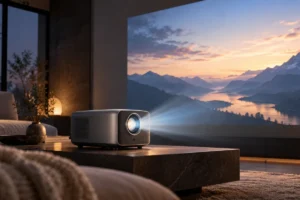
A projector promises a huge picture, while a TV promises an easier movie night. In 2026, the better choice still depends less on the label on the box than on your room, your viewing habits, and the full cost of the setup. We researched the practical trade-offs so you can decide without assuming that bigger always means better.
Brightness: Your Room Makes the First Decision
A TV produces its own light, so it remains easy to watch with lamps on or daylight coming through the windows. A projector sends light to a screen or wall, where room light can wash out dark scenes. If people walk in and out, leave lights on, or watch before sunset, a TV is usually the safer choice.
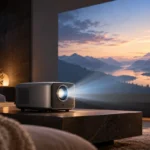
A projector looks best when you can dim the room and control light from windows. Blackout curtains often make a bigger visible difference than a small increase in advertised projector brightness. Even then, a projected image generally cannot match a good TV for deep blacks and bright highlights in a normal living room.
Check brightness specifications carefully. Manufacturers may use ANSI lumens, ISO lumens, or less comparable marketing measurements, and the brightest picture mode may sacrifice color accuracy. Reviews that describe brightness in a usable picture mode are more helpful than a large number on its own. If you want lights that are easy to dim, a simple smart home lighting setup can make movie-night preparation more convenient, but it will not replace control over daylight.
Screen Size per Dollar: Count the Whole Setup
Size is the projector’s strongest argument. At the same widescreen shape, a 100-inch picture has about 2.4 times the area of a 65-inch picture. That difference can feel dramatic when you sit far enough away to take it all in. A projector can therefore deliver a much larger image than a TV for a similar equipment budget.
But the projector is not always the whole bill. A suitable screen, mount or stand, cables, light-blocking curtains, and possibly separate speakers can add to the cost. A plain wall may work for a first try, but its texture, color, and flatness can affect the picture. A TV usually includes a usable screen, speakers, and smart features in one purchase.
Before comparing models, decide what picture size actually fits your room. A giant image viewed from very close seats can be tiring, and an oversized screen may leave no sensible place for speakers. Compare the total setup you would need, not just the projector and TV on their own. That is the honest way to judge screen size per dollar.
Placement and Setup: Measure Before You Choose
A TV needs a stable stand or a suitable wall mount and a nearby power outlet. A projector needs more planning: you must place it at the right distance for the image size you want and keep its light path clear. The required distance varies by model, so check the manufacturer’s throw-distance calculator before choosing a screen or drilling holes.
Short-throw and ultra-short-throw projectors can work closer to the screen, but they still need careful alignment. Ultra-short-throw models are especially sensitive to uneven surfaces, which is one reason they are often paired with a dedicated screen. Keystone correction can straighten a misplaced image, but physical alignment is a better starting point because digital correction can reduce usable detail.
Think about cables and people, too. A projector on a coffee table can be bumped or blocked; a ceiling mount is neater but harder to install. Check where your streaming device, game console, and speakers will connect. If you need a longer video run, this guide to what matters in an HDMI cable can help you avoid paying for features you do not need.
Picture Quality: Big Is Not the Same as Better
For films in a dark room, a large projected image can feel wonderfully immersive. Yet image size is only one part of picture quality. TVs generally have an advantage in contrast, bright highlights, and visibility when room lighting changes. Those differences are especially noticeable with high dynamic range movies, which depend on both bright and dark detail.
Resolution labels also need context. Some projectors display a 4K image using pixel shifting rather than a native 4K imaging chip. That does not automatically make them poor choices, but it means “4K” alone cannot tell you how sharp a particular picture will look. Screen size, viewing distance, focus, and source quality all matter.
Motion, color, and noise deserve a look as well. Some viewers notice the rainbow effect produced by certain single-chip DLP projectors; others do not. Projectors may also have audible fans, while a TV is typically quieter. If possible, watch familiar dark and bright scenes in conditions similar to your room. A showroom with controlled lighting may flatter a projector that will spend its evenings in a bright shared space.
Lamp Life and Running Costs: Read the Fine Print
Traditional lamp projectors have a replaceable light source that gradually dims. Manufacturers often publish different life ratings for different modes, and a longer-life mode may be less bright. To make the number meaningful, divide the rated hours by your likely viewing time. A 5,000-hour rating at 10 hours a week works out to roughly nine and a half years on paper, not a promise that every lamp will last that long.
LED and laser projectors generally advertise much longer light-source life and avoid routine lamp changes, but their light sources also lose brightness over time. A long rating does not mean repairs are free or simple if another component fails. Check whether a lamp is replaceable, what replacement involves, and what the warranty actually covers.
For either device, electricity use depends on the specific model and settings. Multiply its power use in kilowatts by your weekly viewing hours, then by your electricity rate, for a rough weekly cost. Keep ventilation clear and follow the maker’s placement guidance; our guide to protecting gadgets from heat explains why hot, enclosed spaces are a poor home for electronics.
Sound and Everyday Use: Do Not Forget Movie Night
A picture is only half the experience. Built-in TV speakers are convenient, even if they may not deliver deep bass or clear dialogue in a large room. Projector speakers vary, and their location can make voices seem to come from behind or beside you rather than from the screen. Plan for a soundbar or separate speakers if that would bother you.
Check how audio will travel from your streaming device or console to those speakers. HDMI ARC or eARC, an optical output, and Bluetooth are not interchangeable solutions on every device. Bluetooth can also introduce noticeable delay between speech and moving lips, depending on the equipment. Look at the ports on the exact models you are considering, rather than assuming that every current projector has the same connections as a TV.
For quiet viewing when others are asleep, headphones may be simpler than changing the room’s speaker setup. Our earbuds versus headphones guide covers the comfort trade-offs. Finally, think about the routine: a TV is easy to switch on for a short episode, while a projector may mean closing curtains, lowering a screen, and checking focus before the film starts.
A Practical Movie-Night Comparison
Start with the room you actually use, not the room you wish you had. Visit it at your usual movie time, sit where you normally sit, and note the light you cannot easily block. Then measure the wall or TV space and check whether doors, furniture, or walking routes would interrupt a projected image.
- Choose a TV first if you watch in daylight, want a quick setup, or care most about strong HDR and consistent picture quality.
- Consider a projector if you can darken the room, have space for a properly placed screen, and value a very large picture above convenience.
- Compare total costs by including the screen, mounting, sound, light control, and any expected lamp replacement.
- Check the return policy and verify that the chosen model can produce your desired image size from your available placement distance.
If both options fit, decide which compromise you would notice every week. A smaller, brighter TV may get used more often; a projector may make planned film nights feel special. Neither is the better value unless it suits the way you actually watch.
Frequently Asked Questions
Is a projector better than a TV for a bright living room?
Usually not. A TV generally stays easier to see when daylight or room lights wash out a projected picture.
Do I need a screen for a projector?
You can start with a smooth, light-colored wall, but its texture and color may affect the image. A suitable screen gives you a more predictable surface.
Do laser projectors need replacement lamps?
Laser projectors do not use the replaceable lamps found in traditional lamp models. Their light sources still dim over time, and other parts can still need repair.
Which gives a bigger picture for the money?
A projector often wins on image size alone. Compare the full cost of a screen, sound, mounting, and light control before deciding which setup offers better value.
Final Thoughts
Choose a TV for a bright room, dependable picture quality, and minimal preparation. Choose a projector when you can control the light and a truly large image is worth the extra setup. For movie lovers in 2026, the honest math includes more than screen size: count the room, accessories, viewing hours, and effort before you decide.