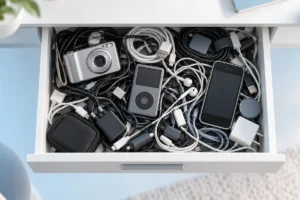
Most gadget drawers hold a mix of useful backups, forgotten purchases, mystery cables, and devices that no longer work. A simple audit can clear space, make the things you own easier to find, and help you avoid buying the same item twice.
Start With an Honest Inventory
Empty the drawer onto a clear surface and group similar items together: devices, chargers, cables, batteries, adapters, and accessories. Check nearby bags, desks, and shelves too. A charger you use every day may not be in the drawer, but it still counts when you decide whether you need another one.
Make a quick list in a notes app or on paper. For each item, record what it is, whether it works, and which device it belongs to. You do not need model numbers for everything. “Short USB-C cable for headphones” is more useful than a detailed entry you will never update.
Set aside anything you cannot identify. Do not throw it away immediately; give yourself a week to check whether it fits a device you still own. Take a photo of the full group before sorting. The picture gives you a simple record to check when you are tempted to buy a replacement or another spare.
Decide What Earns a Place in Your Home
Keep an item if you use it, have a clear plan to use it soon, or need it as a realistic backup. “It might be useful someday” is not enough by itself. A spare phone charger that works with your current phone has a purpose. A charger for a device you gave away years ago probably does not.
Check whether an older gadget still solves a problem. A previous phone could serve as a backup, but only if it powers on, can be charged safely, and is still suitable for what you intend to do. If you keep a laptop, its charger and other essential parts should stay with it. You can also review ways to make a laptop battery last longer before assuming poor battery life means you need another device.
Give each keeper a home. Put daily-use items where you use them and store backups together in one labeled place. If you have more backups than you can reasonably use, choose the best working ones and let the rest go.
Donate or Pass On Devices That Still Work
A working gadget you no longer use may be helpful to someone else. Before donating it, check that it turns on, charges, and includes the parts needed to use it. Be clear about faults, missing accessories, and battery problems. Do not pass along an item as working if you cannot confirm that it works.
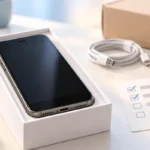
For phones, tablets, computers, and smart devices, back up anything you need, sign out of accounts, remove linked devices, and follow the maker’s reset instructions. Take out memory cards and SIM cards. A reset does not replace checking that account locks have been removed, so confirm the next owner can set up the device.
Small accessories deserve the same honest check. If you own several listening devices, compare how you actually use them before keeping every pair; this guide to wireless earbuds versus headphones can help clarify which type fits your routine. Clean any item you pass on, and ask the recipient or donation group whether they accept that type of gadget.
Recycle What Cannot Be Used Safely
Broken electronics do not belong in the donation pile. Separate devices with cracked cases, exposed wires, unreliable charging, or other faults that make them unsafe or impractical to use. Keep them out of normal household trash where local rules require electronic waste collection, and check your area’s guidance before dropping anything off.
Give batteries extra care. Do not charge or use a battery that is swollen, leaking, damaged, or unusually hot. Follow local instructions for storing and taking it to an appropriate collection point. Avoid opening a sealed device just to remove its battery unless the manufacturer provides safe instructions for doing so.
Data matters even when a device is broken. If a phone or computer still works, erase your information before recycling it. If it will not turn on and contains sensitive data, ask the recycler how it handles data-bearing devices rather than assuming a drop-off includes data destruction. Collect recyclable items in a separate box and schedule a drop-off; otherwise, the box can become a second gadget drawer.
Sort Cables by Use, Not by Appearance
Start by matching cables to devices you still own. Group them by connector, then label any cable with a special job, such as connecting a monitor or transferring files. Keep the cable that came with a device when you know it works and may be needed for that device. Recycle frayed, bent, or exposed cables rather than testing them repeatedly.
Do not assume two cables work the same way because their ends look alike. USB-C cables, for example, can differ in charging and data capabilities. If a cable matters for a particular setup, check its markings or documentation and read this guide to USB-C cables, chargers, and speeds. If you cannot confirm a cable’s capabilities, label it for the basic task you have verified instead of treating it as an all-purpose spare.
Store each type in a small, labeled bag or compartment, with loose loops rather than tight bends. Keep a modest number of useful spares based on the devices you own. Mystery cables can go in a temporary bag with a date on it; if none proves useful after you have checked your devices, recycle them according to local rules.
Stop Duplicate Purchases Before They Happen
The best time to prevent a duplicate purchase is before you start shopping. Search your inventory and check the place where the item should live. If you cannot find a cable or adapter, look in travel bags and beside the devices that use it. Sometimes the problem is storage, not a shortage.
Write down the exact task the new item must handle. “Charge my phone while traveling” is clearer than “get another charger.” Then check whether something you own already does that job safely and conveniently. If you are comparing backup batteries, a guide to what portable power bank specifications mean can help you check your existing one before replacing it.
For non-urgent purchases, pause and check your list again the next day. If you still need the item, note why your current gear falls short. This is not a rule against buying useful technology. It is a way to make sure a new purchase fixes a real problem instead of adding one more object to the drawer.
A Simple Audit Checklist
You do not need to finish everything in one sitting. Start with one drawer and use four groups: keep, pass on, recycle, and identify. Keep the “identify” group small so it does not become permanent storage. If an item needs a charger or adapter to be useful, put the matching parts together.
- Keep: Items you use and backups with a clear purpose. Give each one a labeled place.
- Pass on: Working items you no longer need. Check them, remove personal data, and describe their condition honestly.
- Recycle: Broken or unsafe electronics and unwanted cables. Follow local rules, especially for batteries.
- Identify: Unknown items. Set a date to check what they belong to, then make a decision.
Finish by saving a short inventory of what you kept. Include the location of less-used items, such as a spare charger in a travel pouch. Revisit the list when you replace a device or notice the drawer filling up again. A few minutes of upkeep is easier than repeating the whole audit.
Frequently Asked Questions
How many spare charging cables should I keep?
Keep enough for the devices and places where you regularly charge them, plus a backup if you need one. Recycle damaged cables and extras you have no likely use for.
Should I donate an old phone that still turns on?
You can donate it if it works well enough to be useful. Back up your data, sign out of accounts, remove cards, reset it, and disclose any faults.
What should I do with a swollen battery?
Do not use or charge it. Follow local safety guidance for handling it and take it to an appropriate battery collection point.
How do I stop buying adapters I already own?
Keep a simple inventory with the adapter’s purpose and storage location. Check it and your travel bags before buying another one.
Final Thoughts
A useful gadget drawer is not necessarily empty. It holds working items you can identify and find when you need them. Keep what has a purpose, pass on what still works, recycle what does not, and check your inventory before adding anything new.