Holiday photos are some of the few files you can never get back. A lost bag, a broken phone or a corrupted memory card can wipe out a whole trip in a second. The good news is that a few simple habits can keep your shots safe, wherever you travel.
Why Holiday Photos Get Lost
Most lost holiday photos are not lost because of some rare technical failure. They are lost because there was only one copy, and something happened to it.
Travel puts your gear under more stress than normal life does. You move between hotels, airports and beaches. You charge devices in strange outlets. You are tired, busy and often distracted.
Here are the most common ways photos disappear on a trip:
- A phone is stolen, dropped in water or left in a taxi.
- A camera bag is lost, with the memory cards still inside.
- A memory card stops working or shows an error message.
- Photos are deleted by mistake to free up space.
- Cloud sync was turned off, paused or out of space, and nobody noticed.
Notice the pattern. In almost every case, a second copy stored somewhere else would have saved the day. That is the main idea of this whole guide: never let your photos live in only one place.
The Two-Copy Habit on the Road
The simplest rule for travel photo safety is this: always have at least two copies, and keep them in different places.
Two copies on the same device do not count. If your photos are on your phone and also in a folder on the same phone, one theft takes both. A real second copy lives on a different device, in a different bag, or in the cloud.
A good daily routine looks like this:
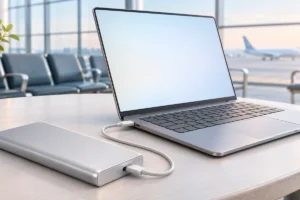
- Each evening, copy the day’s photos to a second device, such as a laptop or portable SSD.
- If you have decent Wi-Fi, let your phone or laptop upload to cloud storage overnight.
- Keep the backup device in a different bag from your camera or phone during the day.
This takes ten minutes or less once it becomes a habit. Doing it every night means the worst you can lose is one day of photos, not a whole trip.
If you are trying to travel light, our travel tech packing list for a single pouch shows how a small backup drive and cable can fit alongside your other essentials.
Phone Photos: Cloud Sync and Local Backups
For many people, the phone is the only camera on holiday. That makes it convenient, but also risky, because phones are the gadget most likely to be lost or stolen.
Cloud photo backup is the easiest protection. Both iPhone and Android phones offer built-in options. Before you leave home, check three things:
- Backup is actually switched on, not just installed.
- You have enough cloud storage left for the trip.
- You know whether it uploads on mobile data or only on Wi-Fi.
Many people find out too late that their cloud storage filled up months ago. Open the app and confirm the last backup date before you travel.
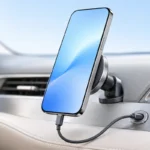
Hotel Wi-Fi can be slow, so uploads may lag behind. That is why a local copy still matters. Many phones can copy photos to a USB-C flash drive or SSD through a file manager app.
Also, clear space before the trip, not during it. Deleting in a rush is how good photos get lost. Our guide on how to free up storage on your Android phone covers safe ways to make room first.
The Laptop and Portable SSD Workflow
If you shoot with a dedicated camera, or take a lot of video, a laptop plus a portable SSD is a reliable setup. Portable SSDs are small, fast and handle bumps better than older spinning hard drives because they have no moving parts.
A simple nightly workflow:
- Insert the memory card into the laptop or a card reader.
- Copy the photos into a folder named by date and place, such as “2026-12-24 Lisbon”.
- Copy that same folder to the portable SSD.
- Open a few files from the SSD to confirm they look right.
- Only then consider the card “backed up”.
Now you have three copies: the card, the laptop and the SSD. Keep the SSD in a different bag from the laptop.
No laptop? Some people use a tablet, or a phone with a card reader, to copy straight to an SSD. It is slower but works.
Cable choice affects speed. A slow cable can turn a five-minute copy into a long wait. Our explainer on USB-C cables, chargers and speeds helps you pick one that matches your drive.
Memory Card Mistakes That Lose Images
Memory cards are small, cheap and easy to forget about. That is exactly why they cause so many problems. Most card failures we researched trace back to a handful of common mistakes.
- Using one huge card for the whole trip. If it fails, everything is gone. Several smaller cards spread the risk.
- Pulling the card out while the camera is writing. Wait for the light to stop blinking, then switch off the camera first.
- Deleting photos on a computer instead of formatting in the camera. Formatting in the camera, after a confirmed backup, keeps the card healthier.
- Formatting before you back up. Never format a card until the photos exist safely in at least two other places.
- Buying cards from unknown sellers. Fake cards sometimes report more space than they really have and can silently lose files.
- Storing cards loose in a pocket. A simple card case protects against dust, water and loss.
If a card shows an error, stop using it right away. Do not take more photos on it. Recovery software often works best on a card that has not been written to since the problem started.
Keeping Your Backup Gear Powered and Safe
A backup plan only works if your devices have power when you need them. On long travel days, a flat laptop can mean you skip the nightly copy, and that is when trouble tends to happen.
A few practical points:
- Charge the laptop during the day so it is ready for backups in the evening.
- Pack a travel adapter that suits the countries you are visiting.
- Keep drives and cards out of hot cars and direct sun.
- Use a padded pouch for the SSD, even though it is fairly tough.
If your laptop struggles to last through a day, our tips on making your laptop battery last longer can help you get through a busy travel day with enough charge left for backups.
Security matters too. Turn on a password or encryption for your portable drive if it supports it. If the drive is lost, strangers should not be able to browse your family photos.
Practical Tips: Comparing Your Backup Options
There is no single perfect method. Each option has strengths and weak spots, which is why combining two of them works best.
- Cloud backup: Safe from theft and damage, and automatic once set up. Depends on good internet and enough storage space.
- Portable SSD: Fast, small and works without internet. Can be lost or stolen along with your bags.
- Laptop: Lets you check, sort and copy photos easily. Heavy, and a target for theft.
- USB-C flash drive: Very small and handy for phone users. Usually slower and less durable than an SSD.
- Extra memory cards: Let you rotate cards and keep full ones untouched. Easy to lose without a case.
For most travellers, a sensible combination is cloud backup plus one physical drive. Photographers who shoot a lot may want a laptop, an SSD and cloud backup together.
When you get home, do one final step. Copy everything to your main computer or home storage, and confirm the cloud copy is complete before reusing any cards.
Frequently Asked Questions
Is cloud backup alone enough for holiday photos?
It is a good start, but it depends on reliable internet and enough storage space. Adding one physical copy, such as a portable SSD, protects you when uploads are slow or paused.
How often should I back up photos while travelling?
Once a day is a good habit for most people. Backing up every evening means you can lose at most one day of photos if something goes wrong.
Should I use one large memory card or several smaller ones?
Several smaller cards spread the risk, so one failure does not wipe out the whole trip. Just keep them in a labelled case so they are not lost.
What should I do if my memory card shows an error?
Stop using the card immediately and do not take any more photos on it. Then try a reputable recovery tool on a computer, since cards that have not been written to again have a better chance of recovery.
Final Thoughts
Protecting holiday photos does not need expensive gear or technical skill. It comes down to one habit: keep at least two copies in different places, and update them every day.
Check your cloud backup before you leave, treat memory cards with care, and never format a card until your photos are safe elsewhere. Do that, and your memories will make it home with you.