A good car tech setup keeps your phone where you can see it, keeps it charged, and keeps cables out of your way. A bad one drops your phone at every pothole and leaves wires tangled around the gear stick. This guide covers mount types that actually hold, simple cable routing, and the accessories that cope with heat and bumps.
Why a Tidy Dash Setup Is Worth the Effort
Most people put together their car setup bit by bit. A cheap mount here, a spare cable there, and a charger that came free with something else. It works, but only just.
The problem is that a messy setup is also a distracting one. If your phone slides off its mount, you reach for it. If a cable hangs near the pedals or gear lever, it can snag. If your navigation screen is too low, your eyes leave the road for longer than they should.
A tidy setup fixes all of this with three simple goals:
- Stable: the phone stays put on rough roads.
- Visible: the screen sits near your line of sight without blocking the road.
- Powered: the phone charges fast enough to keep up with navigation and music.
You do not need to spend a lot to get there. In most cars, a decent mount, one good charger and one or two well-chosen cables are enough. The rest is about placing them sensibly.
Car Phone Mount Types Explained
There are several main styles of car mount. Each one suits a different kind of car and driver.
- Air vent mounts: clip onto a vent slat. Small and cheap, but they can droop with heavy phones and may not fit round or unusual vents. Hot air from the heater can also warm the phone in winter.
- Dashboard mounts: stick to the dash with a suction cup or adhesive pad. Usually very stable and easy to see.
- Windshield mounts: use a suction cup on the glass. Flexible placement, but some places restrict what you can attach to the windshield, so check your local rules.
- Cup holder mounts: sit in a cup holder on an adjustable stem. Very solid, but often too low for comfortable viewing.
- CD slot mounts: slide into an old CD slot. Steady, but they may block nearby buttons or screens.
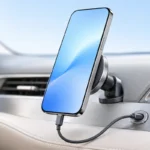
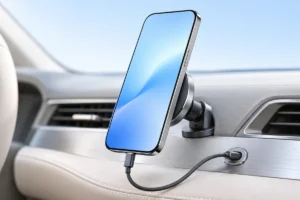
Many mounts are also magnetic, either with a metal plate on your phone case or using MagSafe-style magnets. Some add built-in wireless charging. That is convenient, but wireless charging creates extra heat, which matters in a hot car. If you care about long-term battery life, our guide on keeping your phone battery healthy for years explains why heat is the main thing to avoid.
How to Choose a Mount That Actually Holds
Based on what we researched across user feedback and product details, most mount complaints come down to the same few issues: weak grip, sagging arms and suction cups that let go in the heat.
Here is what to look for:
- Match your phone size and weight. Large phones in thick cases need a mount rated for them. Check the supported width and weight.
- Short arms are steadier. Long, bendy arms look flexible but tend to wobble on bumpy roads.
- Grip style matters. Spring clamps and motorized arms grip from the sides. Magnetic mounts depend on magnet strength and a properly aligned case or plate.
- Check vent design first. Hook-style vent clips hold better than simple push-in clips, but only if your vent slats are strong enough.
- Suction needs a clean, smooth surface. Textured dashboards often need an adhesive base disc to work well.
Placement also matters for safety. Never put a mount where it could block an airbag, your view of the road or important controls. A spot slightly left or right of the steering wheel, near eye level, is usually the best balance.
Car Chargers: Ports, Power and What You Really Need
Many cars have built-in USB ports, but older ones often deliver very little power. They may be fine for music over a cable, yet too slow to charge a phone that is running navigation with the screen on.
A plug-in charger for the 12V socket (the old cigarette lighter) is usually the easy fix. When choosing one, look for:
- USB-C with Power Delivery (PD): the modern fast-charging standard for most phones and many tablets.
- Enough total power: around 20W per phone is plenty for most people. Higher outputs mainly help laptops or tablets.
- Clear per-port ratings: on dual-port chargers, the power is often split when both ports are in use.
- A low profile: flush designs sit almost level with the socket and are less likely to get knocked.
- Safety markings: look for recognized certification marks and protection against overheating and short circuits.
The cable matters just as much as the charger. A weak or old cable can limit charging speed. If the labels on chargers and cables confuse you, our explainer on USB-C cables, chargers and speeds breaks it down in plain terms.
Cable Routing for a Clean, Safe Look
Even the best mount looks messy with a long cable flopping across the dash. Good routing takes about ten minutes and makes a big difference.
- Use the right length. Measure from the charger to the mount. A 1 meter cable is often enough. Extra length just ends up looped and tangled.
- Follow the edges. Run cables along trim lines and panel gaps rather than across open surfaces.
- Use small adhesive clips. Cable clips or routing channels keep wires in place and stop them sliding toward the pedals.
- Tuck into gaps carefully. Some trim gaps can hide a thin cable. Do not force panels open or squeeze cables into areas near airbags.
- Try right-angle connectors. An L-shaped plug at the phone or charger end reduces strain and sticks out less.
If your car has no spare socket, or you often charge outside the car too, a small power bank can be a tidy backup. Our guide to what power bank specs really mean helps you pick a sensible size. Just do not leave it baking in a parked car on a hot day.
Heat, Sun and Bumps: Accessories That Survive
A car is a tough place for electronics. On a sunny day, a parked car’s interior can get much hotter than the air outside, and the dashboard is often the hottest surface of all. Add constant vibration, and cheap gear wears out fast.
A few things help accessories last longer:
- Heat-resistant adhesives: standard sticky pads can soften and slide in summer. Mounts that advertise heat-rated adhesive tend to hold up better.
- Quality suction cups: soft gel-style cups usually grip better on warm days than hard plastic ones. Clean them now and then to restore grip.
- Braided or thick cables: these handle repeated bending and door-pinching better than thin cables.
- Sun shades: a windshield shade lowers dash temperature and protects both the mount and your phone.
Most important of all, do not leave your phone on the mount in a parked car in direct sun. Phones may shut down or stop charging to protect themselves. For more ways to keep devices safe in warm weather, see our guide on protecting your gadgets from summer heat.
Quick Comparison and Practical Setup Tips
Not sure which mount suits you? Here is a simple summary:
- Best for small cars and light phones: a hook-style vent mount.
- Best for stability and viewing: a dashboard mount with a short arm.
- Best for heavy phones: a cup holder mount, if the lower position works for you.
- Best for quick in-and-out: a magnetic mount with a matching case.
- Best for long drives with navigation: any steady mount paired with a USB-C PD charger.
And a few tips that apply to almost every car:
- Set up your route and music before you start driving.
- Test the mount on a bumpy road at low speed before trusting it.
- Keep a spare cable in the glove box in case one fails.
- Remove the phone when parked to reduce heat and theft risk.
- Check suction and adhesive grip at the start of each summer.
Frequently Asked Questions
Which type of car phone mount is the most stable?
Dashboard mounts with a short arm and cup holder mounts are usually the most stable. Vent mounts can work well too, but only if your vents are sturdy and your phone is not too heavy.
Is wireless charging in a car mount bad for my phone?
It is not harmful by itself, but wireless charging produces more heat than a cable. In a hot car, a wired USB-C connection is usually the cooler and faster option.
Why does my phone charge so slowly in the car?
Built-in car USB ports often supply very little power, and older cables can limit speed further. A USB-C Power Delivery charger in the 12V socket with a good cable usually fixes this.
Can magnetic mounts damage my phone?
Modern phones are generally not harmed by mount magnets. The bigger concern is a metal plate blocking wireless charging or a weak magnet letting the phone fall on bumpy roads.
Final Thoughts
A clean car tech setup does not need to be complicated or costly. Choose a mount that suits your car and phone, add a proper USB-C charger, and spend a few minutes routing the cable neatly. Keep heat in mind, and your phone, cables and mount will all last longer. The result is a calmer, safer drive with fewer distractions.