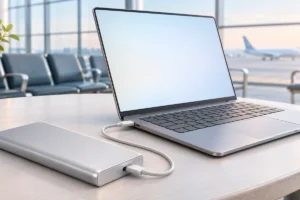
A laptop power bank promises freedom from wall sockets on trains, planes and park benches. But does it really work, and for how long? We researched the specs, the math and the airline rules so you can decide if one fits the way you work.
What Makes a Laptop Power Bank Different
A phone power bank and a laptop power bank look alike, but they are built for very different jobs. A phone needs around 20 to 30 watts to charge quickly. Most laptops need 45 to 100 watts, and they draw that power for hours.
That means a laptop power bank needs two things a small phone pack usually lacks. First, a much bigger battery inside. Second, a high-power output port that can talk to your laptop and agree on the right voltage.
Today that port is almost always USB-C with USB Power Delivery (often shortened to USB PD). Your laptop and the power bank “negotiate” how much power to send. If the bank cannot offer enough, the laptop may charge slowly, only charge while asleep, or refuse to charge at all.
The cable matters too. A basic USB-C cable is usually limited to 60 watts, while a cable rated for 100 watts or more has a small chip that allows higher power. If you are unsure which cable you own, our guide to USB-C cables, chargers and speeds explains the differences in plain language.
Watt-Hours: The Capacity Number That Matters
Power banks love to advertise big milliamp-hour (mAh) numbers, like 20,000 mAh or 27,000 mAh. The trouble is that mAh alone does not tell you how much energy is stored. You also need the voltage.
Watt-hours (Wh) combine both, which makes them the honest number to compare. The formula is simple:
- Watt-hours = mAh × voltage ÷ 1,000
- Most power banks use cells rated at about 3.6 to 3.85 volts
- So a 20,000 mAh bank at 3.6 V holds about 72 Wh
- A 25,000 to 27,000 mAh bank usually lands just under 100 Wh
Laptop batteries are also rated in watt-hours, so this lets you compare apples to apples. You can usually find your laptop’s battery size in its spec sheet or system information.
Many reputable brands print the Wh figure directly on the case, partly because airlines ask for it. If a power bank hides this number, treat that as a small warning sign. For a deeper look at labels and ratings, see our explainer on what power bank specs really mean.
Real Charge Math: How Much Will You Actually Get?
Here is where many buyers feel let down. A 100 Wh power bank will not deliver 100 Wh into your laptop. Energy is lost as heat while converting voltage and while the laptop charges its own battery.
Based on what we researched, a realistic efficiency is roughly 70 to 85 percent. Using 75 percent as a fair middle ground, here is what that looks like:
- A 72 Wh bank gives about 54 Wh of usable charge
- A 99 Wh bank gives about 74 Wh of usable charge
- A thin laptop with a 50 Wh battery could get roughly one full charge from the smaller bank
- A larger 70 Wh laptop battery might get just one charge from the bigger bank
In everyday terms, a good laptop power bank roughly doubles your working time. It does not give you three or four extra days.
Your results depend heavily on what you do. Writing documents and browsing use far less power than video calls, photo editing or gaming. Screen brightness alone can change your runtime noticeably.
Wattage Output: Will It Keep Up While You Work?
Capacity tells you how much energy is stored. Output wattage tells you how fast it can be delivered. Both matter.
A simple rule: try to match the power bank’s USB-C output to your laptop’s original charger. If your laptop came with a 65 W charger, a 65 W or 100 W power bank port is a good fit.
A lower-wattage bank can still help. A 30 W output may be enough to slowly charge a light laptop while it sleeps, or to slow the battery drain while you work. But under heavy use, the laptop may still lose charge even while plugged in.
Watch out for one more detail. Many power banks list a total output, such as 140 W, that is shared across several ports. If you charge your phone at the same time, the laptop port may drop to a lower wattage. Check the per-port numbers, which are usually printed on the case or listed in the manual.
Newer USB PD versions allow up to 240 W, but most laptops still charge at 100 W or less over USB-C, so higher numbers will not always help.
Airline Rules: What You Can Fly With
Airlines treat large lithium batteries seriously, and the rules are fairly consistent around the world. Always check your own airline before flying, but the common guidelines look like this:
- Power banks must go in carry-on bags, never in checked luggage
- Up to 100 Wh: generally allowed without special approval
- Over 100 Wh up to 160 Wh: usually needs airline approval, often limited to two
- Over 160 Wh: generally not allowed on passenger planes
This is why so many laptop power banks stop at around 99 Wh. It is the largest size most travelers can carry without extra paperwork.
Some airlines have added stricter rules in recent years, such as banning power bank use during flights or requiring them to stay out of overhead bins. Clear Wh labeling also matters, because security staff may confiscate a bank with no visible rating.
If you are planning a trip, our travel tech packing list can help you decide what else belongs in your carry-on pouch.
Which Laptops Suit Battery Packs (and Which Don’t)
Not every laptop is a good match for a power bank. Here is a simple breakdown based on typical designs.
Great fit: thin and light laptops, ultrabooks, Chromebooks and most recent MacBook Air models. They often charge over USB-C at 30 to 65 W and have batteries around 40 to 60 Wh. A single 99 Wh bank can roughly double their runtime.
Decent fit: larger productivity laptops and 14- to 16-inch models that charge at 90 to 100 W over USB-C. A strong bank helps, but expect less than one full extra charge on bigger batteries close to 100 Wh.
Poor fit: gaming laptops and mobile workstations. Many need 150 to 330 W through a barrel or proprietary connector. A USB-C power bank may only slow the drain while idle, and it will not keep up while gaming.
Check first: older laptops without USB-C charging. These need a bank with a dedicated DC output and the right adapter tip, which is a smaller and less common category.
Practical Tips for Working Untethered
A power bank works best as part of a plan, not as the whole plan. These habits help you get the most from it:
- Start full. Charge both your laptop and the power bank the night before. Large banks can take two to four hours to refill.
- Lower your power use. Dim the screen, close heavy apps and turn on battery saver mode. Small changes add real minutes.
- Charge before you hit zero. Plugging in around 30 to 40 percent lets you keep working smoothly.
- Use a proper cable. Pair a 100 W rated USB-C cable with a high-output bank.
- Keep it cool. Heat reduces efficiency and battery life, so avoid charging in direct sun or inside a closed bag.
- Look for pass-through charging if you want to refill the bank and laptop from one wall outlet when you do find one.
Your laptop’s own settings make a big difference too. Our guide on how to make your laptop battery last longer covers simple tweaks that stretch every charge.
Frequently Asked Questions
Can any power bank charge a laptop?
No. Your laptop needs to support USB-C charging, and the power bank needs a USB Power Delivery port with enough wattage, ideally matching your laptop’s original charger.
How many times can a 20,000 mAh power bank charge my laptop?
A 20,000 mAh bank holds about 72 Wh, and after conversion losses you can expect around 50 to 60 Wh of usable energy. That is roughly one full charge for a thin laptop with a 50 Wh battery, and less for larger laptops.
Can I take a laptop power bank on a plane?
Usually yes, as long as it is in your carry-on and rated at 100 Wh or less. Banks between 100 and 160 Wh typically need airline approval, so check your airline’s rules before you fly.
Is it bad for my laptop to charge from a power bank?
No, charging from a quality USB PD power bank is generally as safe as using a wall charger. Stick to reputable brands with clear ratings and avoid using damaged or swollen batteries.
Final Thoughts
Yes, you can work untethered with a laptop power bank, but with realistic expectations. For thin and light laptops, a 99 Wh bank with a 65 W or higher USB-C port can roughly double your working time and still fly with you. For gaming laptops and power-hungry workstations, a power bank is more of a safety net than a full solution. Check your laptop’s charger wattage and battery size first, do the simple math, and you will know exactly what to expect.